Thursday, 23 June 2016

Sitecore rich text editor avoid generating <p> tags while pressing enter

By Default when you press enter in Sitecore RTE. It will generate <p> <br/> </p> tag. If you dont want it to generate paragraph text and you just want <br/> tags while pressing RTE. You can change below settings.


 <!--  HTML EDITOR LINE BREAK
            Specifies the tag that the HTML editor inserts on Enter. Values can be
            "br", "div" and "p".
      -->
      <setting name="HtmlEditor.LineBreak" value="br" />
   

Wednesday, 8 June 2016

Sitecore - Use subdomains for multi tenant or multi sites


If you want to share domain/host name  across your tenant sites in Sitecore. You can achieve it using below site definitions

<site  name="CountryGerman" virtualFolder="/german" physicalFolder="/german"
             rootPath="/sitecore/content/SiteGerman" hostName="yourhostname" targetHostName="yourhostname"
            startItem="/home" database="web" domain="extranet" allowDebug="false" cacheHtml="true" htmlCacheSize="10MB"
            registryCacheSize="0" viewStateCacheSize="0" xslCacheSize="5MB" filteredItemsCacheSize="2MB" language="en"
            enablePreview="true" enableWebEdit="true" enableDebugger="false" disableClientData="false" />            
 
<site  name="CountryIndia" virtualFolder="/india" physicalFolder="/india"
             rootPath="/sitecore/content/SiteIndia" hostName="yourhostname" targetHostName="yourhostname"
            startItem="/home" database="web" domain="extranet" allowDebug="false" cacheHtml="true" htmlCacheSize="10MB"
            registryCacheSize="0" viewStateCacheSize="0" xslCacheSize="5MB" filteredItemsCacheSize="2MB" language="en"
            enablePreview="true" enableWebEdit="true" enableDebugger="false" disableClientData="false" />            

 
<site  name="main" virtualFolder="/" physicalFolder="/"
             rootPath="/sitecore/content/yoursite" hostName="yourhostname" targetHostName="yourhostname"
            startItem="/home" database="web" domain="extranet" allowDebug="false" cacheHtml="true" htmlCacheSize="10MB"
            registryCacheSize="0" viewStateCacheSize="0" xslCacheSize="5MB" filteredItemsCacheSize="2MB" language="en"
            enablePreview="true" enableWebEdit="true" enableDebugger="false" disableClientData="false" />            


With above site definitions 

  • http://yourhostname will get resolved to "main" site. 
  • http://yourhostname/india will get resolved to "CountryIndia" site.
  • http://yourhostname/german will get resolved to "CountryGerman" site. 

Important - The order of site definitions are very important here. the default site which uses the default domain(not sub domain) should always come at last.  

This approach we can use even if we need a device specific or langauge specfic subdomain for the same site.

Sunday, 5 June 2016

Enabling Developer Center in Sitecore 7.5 and above


Sitecore Developer Center is disabled in Sitecore 7.5 and above. It can be accessed via

http://hostname/sitecore/shell/default.aspx?xmlcontrol=IDE

but if you want to add it in Sitecore desktop mode under developer tools as in earlier version follow below steps.

1. Open Sitecore in Desktop mode.

2.  Change the database to Core either from changing the content db from bottom right or add a query string "?sc_content=core"


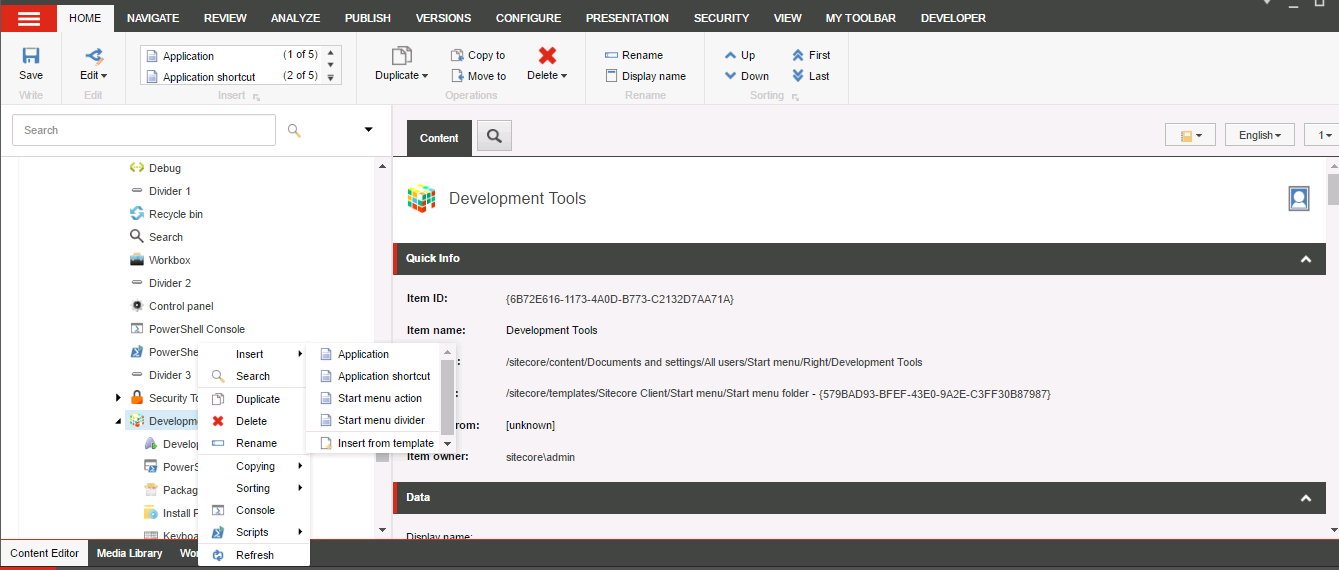
3. Right click on "/sitecore/content/Documents and settings/All users/Start menu/Right/Development Tools" item and add a Application shortcut with name Developer Center.


4. Put Application Link and Display Name field values as in below image.


5.  Go back to master db . You should be able to see Developer Center option under Developer Tools now.


Wednesday, 25 May 2016

Reset Admin password for sitecore using SQL Query

Run this SQL query in your core database

UPDATE dbo.aspnet_Membership

SET [Password]='qOvF8m8F2IcWMvfOBjJYHmfLABc=', [PasswordSalt]='OM5gu45RQuJ76itRvkSPFw==',
[IsApproved] = '1', [IsLockedOut] = '0'
WHERE UserId IN (SELECT UserId FROM dbo.aspnet_Users WHERE UserName = 'sitecore\Admin')

Tuesday, 29 March 2016

Sitecore WFFM Google recaptcha not working in china

Hi ,

In latest version of sitecore WFFM, they have upgraded the captcha to  google recaptcha. But as expected it is giving issues in China and other countries where google is blocked. So we raised a support ticket with Sitecore for a patch to fix it.  Please find below the patch details.

http://dl.sitecore.net/hotfix/wffm/Web Forms for Marketers 8.0 rev. 151127 Hotfix 103340.zip


Important: Please note that additional steps are required after the package installation:
- Select the following item "/sitecore/system/Modules/Web Forms for Marketers/Settings/Field Types/Complex/Captcha" and change MVC Type field value to:
Sitecore.WFFM.Mvc.MsCaptcha.ViewModels.Fields.CaptchaField,Sitecore.WFFM.Mvc.MsCaptcha. 
It will allow MVC form to use MSCaptcha.
 - Publish the "/sitecore/system/Modules/Web Forms for Marketers/Settings/Field Types/Complex/Captcha" item.
 - Publish the "/sitecore/system/Modules/Web Forms for Marketers/Settings/Meta data/Mvc Validation Error Messages/Custom Errors/Captcha Response" item.
 - The package should be installed on all your CM and CD servers. For CD instance(s) unpack all files with corresponding paths from the files folder within hotfix package to Website folder of CD instance.


I really hope this one helps someone :) :)